How to Design a Simple Calibration Part for Fit Testing
The simplest useful fit-calibration part is a small coupon that reproduces the real interface and tests a short series of clearances. If the final part uses a round peg and hole, test round features. If it uses an enclosure tab, test a tab and slot. Do not rely on a generic calibration cube to predict whether an assembly will fit.
Keep the feature size, engagement length, print orientation, material, layer height, walls, and slicer settings close to the production part. Change only the clearance between samples. That turns the coupon into a direct answer to the important question: which CAD allowance produces the required fit on this process?
Start with the actual mating interface
Sketch the production joint before designing the coupon. Record the mating shape, nominal size, insertion direction, engagement length, print orientation, and required behavior. “Fits” might mean a loose sliding joint, a hand-assembled locating fit, or a connection that holds without hardware. Those are different pass conditions.
Feature type matters because positive and negative geometry can print differently. A 10 mm external pin and a 10 mm internal hole should not be assumed to have equal and opposite errors. Research on printed holes likewise shows that geometry and process conditions affect dimensional accuracy and repeatability. Research on dimensional accuracy in 3D-printed holes examines these effects using complete-bore pin checks rather than treating one opening measurement as the whole result.
This feature-specific approach is also reflected in the NIST additive-manufacturing test artifact, which evaluates pins, holes, edges, and steps as distinct features. One overall outside dimension cannot establish that every type of feature is accurate.
Build a compact stepped-clearance coupon
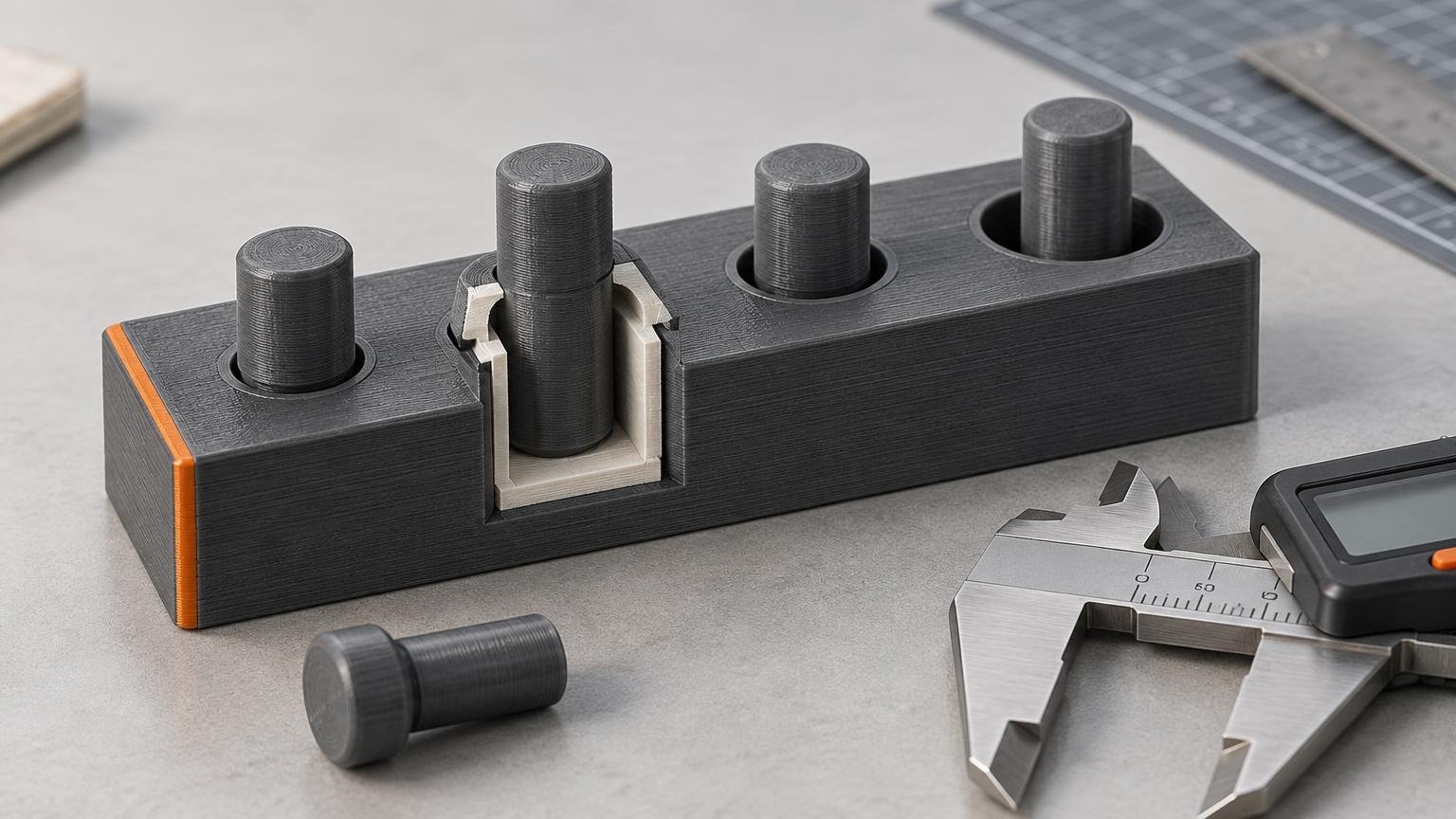
A practical coupon can have one male reference feature and five or six labeled female features. For a round joint, use one peg and a row of holes. For an enclosure, use one tab and several slots. Give each opening the same engagement depth as the real joint when practical.
Choose a clearance range that brackets the value you expect to use. For example, a 10.00 mm peg could be paired with openings modeled at 10.00, 10.10, 10.20, 10.30, and 10.40 mm. These correspond to 0.00 through 0.40 mm of total diametral clearance. They are example test values, not universal recommendations.
| Coupon element | Design choice | Why it matters |
|---|---|---|
| Male feature | Match the production shape and nominal size | Represents the positive side of the joint |
| Female series | Increase total clearance in consistent steps | Identifies the transition from interference to usable fit |
| Engagement length | Approximate the real insertion depth | A shallow opening can hide binding deeper in the joint |
| Labels | Emboss or deboss each clearance value | Keeps results traceable after printing |
| Base | Use enough thickness to resist flexing | Prevents coupon bending from disguising a tight fit |
State clearly whether a value represents total clearance or clearance per side. For a 10.00 mm peg in a 10.20 mm hole, total diametral clearance is 0.20 mm and nominal radial clearance is 0.10 mm per side. Mixing those conventions is an easy way to transfer the wrong allowance into the final model. For more detail on selecting the series, see peg-and-socket clearance testing.
Keep adjacent openings far enough apart that their perimeters and wall paths do not merge. Also leave room for readable labels without placing text on a mating surface. The coupon should be compact, but material savings are not useful if neighboring features distort one another.
Match production print conditions
Print the coupon with the same machine, nozzle, material, layer height, orientation, wall count, speed strategy, and relevant slicer adjustments planned for the final part. Material-extrusion dimensions can change with geometry, orientation, layer thickness, shell count, speed, material, printer, and slicer settings. A successful fit therefore belongs to the tested combination, not to FDM printing in general.
Do not rotate a convenient coupon flat if the production joint will be printed vertically. Layer paths, overhang behavior, seam placement, and stair-stepping can change the mating surface. If the final design may use two orientations, print and label two coupons.
Watch the build-plate edge as well. First-layer squish can widen the bottom of a feature and create a false interference point. Place the critical interface above the first layers, add the same production chamfer, or deliberately include the bottom edge if that is the condition you need to test. Slicer elephant-foot compensation exists, but its correct value is process-specific.
Measure the part, then test its function
Allow the coupon to cool before evaluating it. Measure the male feature and accessible female dimensions at multiple positions, using consistent caliper pressure. Record the readings instead of reducing the coupon to one nominal-versus-actual number. A repeatable caliper measurement method helps separate broad dimensional error from seams, bulges, and local defects.
Next, perform the actual assembly test. Insert the reference feature through the full intended engagement length and classify each opening with practical language such as no entry, starts but binds, hand press, smooth slide, or loose. For through-holes, the smallest pin that passes completely through the bore can be more informative than a caliper reading taken only at the entrance.
- Printer, nozzle diameter, and slicer version
- Material brand, type, and condition
- Layer height, orientation, walls, and relevant speed settings
- Nominal male and female dimensions
- Declared total or per-side clearance
- Measured dimensions at defined locations
- Functional result through the full engagement length
- Any sanding, drilling, reaming, or other post-processing
If every hole is undersized or changes diameter along its depth, investigate the cause rather than automatically adding more CAD clearance. The problem may involve first-layer flare, over-extrusion, unsupported geometry, or another process error. Diagnosing undersized printed holes is the better next step when the coupon reveals a systematic bore problem.
Transfer the result without overgeneralizing it
Choose the smallest tested clearance that reliably produces the required behavior, then apply it to the matching production interface. If 0.20 mm total clearance gives the desired sliding fit, that result supports a similar feature printed under the same conditions. It does not prove that every hole, slot, material, orientation, or printer should use 0.20 mm.
For a critical joint, print the selected coupon again or include the chosen interface in a short production-section prototype. Repeated artifacts can help monitor a process after maintenance or recalibration, but a single coupon is not a printer-wide accuracy guarantee.
The clear next step is to model one representative male feature, surround it with a labeled five- or six-step female series, and print it exactly as the final joint will be printed. Select the allowance by full-depth functional fit—not by which opening merely looks closest to nominal.
References
- Investigations on Factors Affecting 3D-Printed Holes Dimensional Accuracy and Repeatability
- Analysis of PLA Geometric Properties Processed by FFF Additive Manufacturing: Effects of Process Parameters and Plate-Extruder Precision Motion
- NIST Additive Manufacturing Test Artifact | NIST
- An Additive Manufacturing Test Artifact
- Elephant foot compensation | Prusa Knowledge Base