
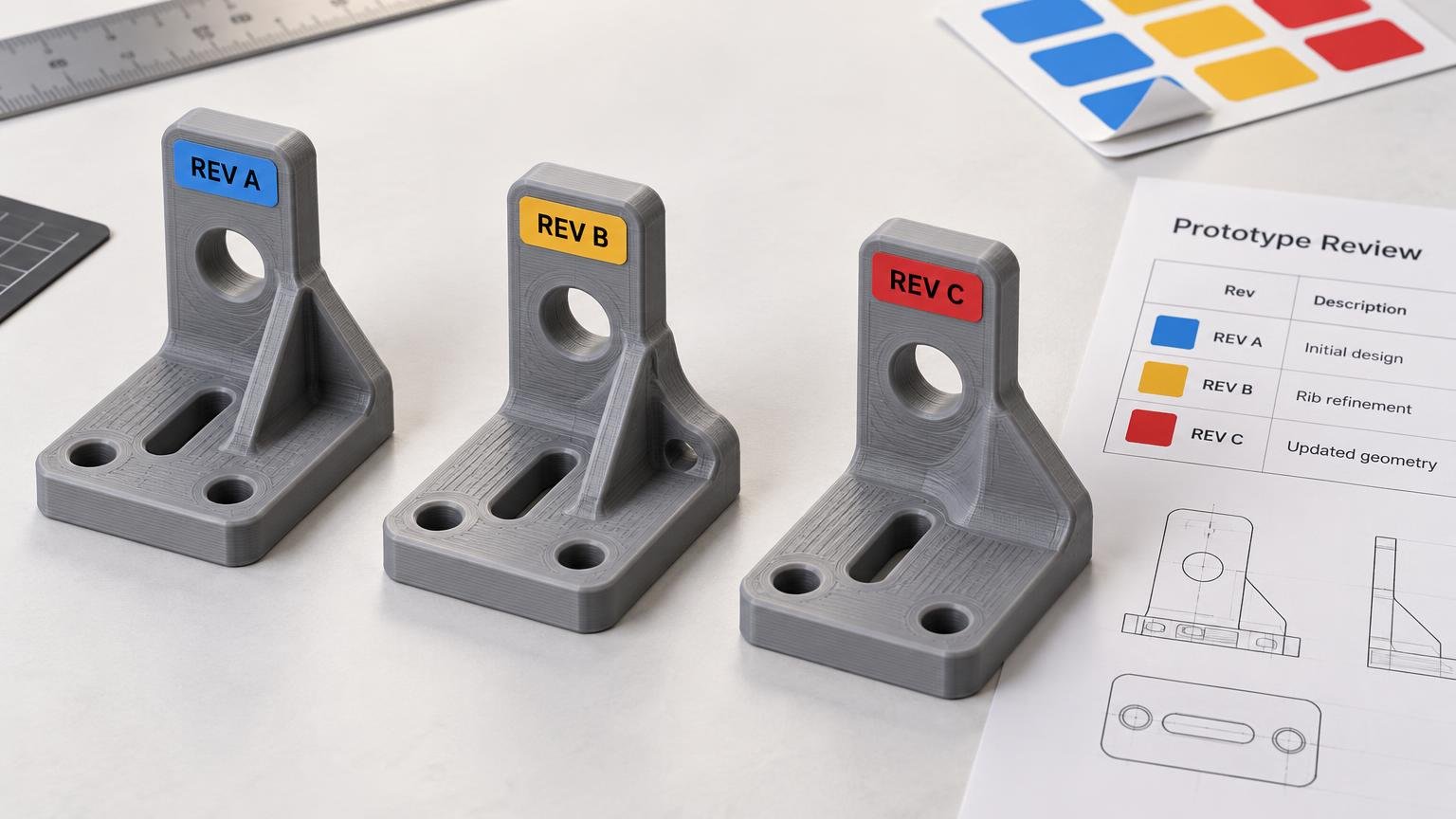
How to Label 3D-Printed Prototype Revisions for a Client Review
Give every physical prototype a short, unique revision ID, then repeat that ID on its bag or tray and in the client-review record. That three-point match is the most reliable answer to How to Label 3D-Printed Prototype Revisions for a Client Review. A label is successful only when it identifies the correct design state without hiding the dimensional or functional evidence the client needs to inspect.
The buying decision is mainly about format. Choose individual vinyl stickers when many separate parts need the same style of standalone identifier. Choose a sticker sheet when one review kit needs a coordinated mix of revision, status, orientation, package and spare labels. In either case, test the adhesive on the exact printed surface and keep the label away from measurement, mating and motion-critical features.
Define the labeling job before choosing stickers
Start with the review workflow, not the sticker catalog. Count the physical prototypes, distinct revision IDs and repeat prints. Then decide whether each item will remain in a controlled tray or move independently through packing, shipping and client handling.
Record these requirements before requesting a proof or quote:
- Number of physical prototypes in the review kit
- Number of distinct designs or revision IDs
- Number of repeat prints within each revision
- Dimensions of the safe label zone on each part
- Whether the label belongs on the part, its container or both
- Whether parts can become separated during shipping or handling
- Required human-readable information and any optional QR code
- Number of duplicate labels needed for bags, trays and review documents
Small functional parts often have no safe area for direct labeling. A bag, compartmented tray, hang tag or review card is better when a sticker would cover a datum, alter a fit or wrap poorly around a curved surface. Container-level identification is not a compromise if the container remains paired with the part throughout the review.
Build a revision ID that identifies the actual print
A useful identifier separates the design revision from the physical print instance. The revision tells the client which design state is represented. A print or unit ID distinguishes two copies made from the same model, including copies produced with different materials, orientations or process settings.
A compact pattern is: Project–Part–Revision–Print–Date.
For example, HINGE-204-R03-P2-2026-10-19 identifies project HINGE, part 204, revision 03 and the second physical print associated with that revision. The date helps locate the corresponding review record, but it should not replace the revision or print identifier.
This approach follows the broader configuration-control principle of assigning unique identifiers and maintaining a relationship between a product configuration and its documentation. NASA’s configuration-management standard describes those traceability principles, although an ordinary client review does not need the complexity of an aerospace configuration system.
Keep the primary ID short enough to read without rotating or unpacking the part. Put secondary production details on a second line or in the linked review record. Depending on what the client is evaluating, those details might include material, nozzle, layer height, orientation, post-processing state or cavity side.
| Label field | Example | Purpose |
|---|---|---|
| Project and part | HINGE-204 | Connects the sample to the correct assembly and component |
| Revision | R03 | Identifies the design state |
| Print or unit | P2 | Distinguishes repeat prints of the same revision |
| Date | 2026-10-19 | Helps locate the matching review record |
| Optional condition | PETG, side orientation | Records a process variable when it affects interpretation |
Do not use color as the only revision signal. A red dot may be convenient inside the workshop, but it becomes ambiguous when labels fade, photographs are converted to grayscale or a client receives several projects using the same color scheme. Human-readable text should remain the primary identifier.
Keep labels away from evidence-bearing surfaces
Reserve a noncritical, reasonably flat label zone in the CAD model or review plan whenever possible. The label should not change the measurement, fit, motion or appearance under review.
Avoid placing a sticker over:
- Datum faces and caliper or micrometer contact points
- Peg, socket and bore surfaces used to evaluate fit
- Threads, snap features, hinges and sliding tracks
- Seal lands, gasket seats and bonding areas
- Bearing seats and other close-tolerance interfaces
- Cosmetic show faces being reviewed for print quality
- Areas that must be sanded, painted, bonded or heat-treated later
This matters even when a label is thin. A sticker can obscure layer defects, interfere with a sliding interface or cause the client to measure the label rather than the printed surface. If the prototype is intended to validate a peg-and-socket connection, preserve the interface and document the target clearance using the same logic applied when testing 3D-printed peg and socket tolerances.
For dimensionally sensitive parts, mark the packaging and include a small orientation diagram on the review card. That preserves the part while still showing which face, bore or feature corresponds to each requested measurement.
Test adhesion on the actual printed surface
Do not infer adhesion from the filament name alone. Layer texture, curvature, surface contamination, paint, sanding, vapor smoothing and release residue can all change the contact available to a pressure-sensitive adhesive. A sticker that stays flat on one PLA sample does not establish performance on another print, much less on PETG, ABS, resin or a coated part.
General 3M pressure-sensitive adhesive guidance supports applying labels to a clean, dry substrate, using firm pressure, allowing adhesion to build over time and testing the target substrate when compatibility is uncertain. Treat those points as application controls, not as proof that a particular sticker will work on every 3D-printed surface.
Run a small validation before assembling the client kit. Apply the proposed label to a representative scrap coupon or noncritical area made with the same material, orientation and post-processing. Check whether the edges lift after the expected dwell period and after handling similar to packing and review. Also confirm that removal, if required by the project, does not damage the finish. If the result is uncertain, label the bag or tray instead.
Individual stickers versus sticker sheets
The two formats solve different inventory problems. Neither is automatically more durable or economical without matched specifications and testing.
| Review situation | Preferred format | Reason |
|---|---|---|
| Many separate prototypes using one label design | Individual stickers | Easy to distribute as repeated standalone identifiers |
| One low-volume kit with many different IDs | Sticker sheet | Keeps mixed labels organized on shared backing |
| Tiny or highly functional parts | Package label | Avoids covering critical part surfaces |
| Part, bag and tray each need matching IDs | Sticker sheet or duplicated singles | Supports repeated identifiers across the kit |
| Labels face substantial handling | Either, after validation | Format does not replace surface-specific adhesion testing |
Choose CustomStickers for repeated standalone labels
CustomStickers is the stronger fit when separate prototypes need individual die-cut identifiers that can be distributed independently. Its custom-sticker page lists white vinyl with laminate, matte and gloss finish choices, online proofing and sizes from 2 to 6 inches for the cited configuration. Review the current custom vinyl sticker options before ordering, particularly if the available label zone is smaller than those listed sizes.
This format makes practical sense for repeated part labels, package seals or a run of identical project tags. It is less convenient when every prototype needs a different ID and the review kit also needs status labels such as APPROVED, REPRINT, LEFT, RIGHT or CLIENT COPY. For broader project needs, custom sticker formats can be considered after the safe label dimensions and required quantities are known.
Choose YouStickers for a coordinated review sheet
YouStickers is the more natural choice when a low-volume review kit needs several label designs kept together. Its sticker-sheet product uses a kiss-cut format, meaning multiple peelable labels remain organized on one shared backing sheet. The product page lists multiple-design uploads, online proofs, matte or gloss laminate and quantities beginning at five sheets.
The listed standard sheet sizes are 6 × 4, 7 × 5, 8.5 × 5.5 and 11 × 8.5 inches, with custom width and height fields from 1 to 11 inches. The company also provides layout guidance covering bleed, text-safe margins and spacing between cutlines. Check the current sticker sheet specifications while preparing the artwork because selectable sizes, minimum quantities and production terms can change.
A sheet can hold two copies of every revision ID—one for the prototype or its immediate container and one for the outer package—plus tray markers, orientation arrows and spare labels. The limitation is operational: if samples are distributed to several people or locations, standalone stickers may be easier to divide than one coordinated sheet.
Design for fast human identification
The client should be able to identify a sample before opening a spreadsheet or scanning a code. Use a large revision ID, high contrast and a restrained information hierarchy. Put the project and part number first, the revision and print ID second, and optional process details last.
Matte is a sensible editorial preference when glare from overhead lights or photography could make small text harder to read. Gloss may still suit a package or visual presentation where reflections are not a concern. That choice is about review conditions, not an unsupported claim that one finish adheres better.
A QR code can supplement the printed ID by opening a review record, dimensional report or change log. It should not be the sole identifier. CustomStickers states that 0.5 inch is its smallest readable QR-code size and cautions that a code may not work on every phone. Treat that figure as vendor guidance rather than a guarantee: test the final printed code with the devices and lighting likely to be used, and preserve the human-readable revision text.
Compare complete orders rather than headline prices
A responsible cost comparison requires matching label area, quantity, number of designs, finish, proofing, turnaround, shipping destination, taxes and shipping speed. An individual-sticker order and a multi-design sheet are not directly comparable merely because both display a low unit price.
Calculate the usable cost per labeled prototype instead. Include duplicate package labels, inevitable spares and unused labels created by the minimum quantity. A sticker sheet may reduce organizational effort for a mixed kit even if some positions remain unused. Individual stickers may be more efficient when the same identifier layout is repeated across many parts. Obtain both quotes on the same date before naming a price winner.
Proof the labels against the review record
The final proof check should compare every physical identifier against the CAD release, print log and client-review matrix. Visual polish cannot compensate for an R02 sticker applied to an R03 part.
- Create one row for every physical prototype, including repeat prints.
- Assign the revision and print ID before generating label artwork.
- Measure the safe label zone on the actual part or representative print.
- Duplicate each ID for the part or inner container and the outer package.
- Check every label against the CAD filename and review record.
- Verify material and process notes only where they affect the client’s interpretation.
- Inspect the vendor proof for spelling, cutlines, margins and label dimensions.
- Test adhesion and readability on the exact target surface.
- Apply labels with enough lead time for adhesion to develop before packing.
- Photograph or log the completed kit so shipped samples can be reconciled with the review record.
The practical next step
Build the ID matrix before ordering anything. Count the unique revisions, assign a print or unit ID to every physical sample, and measure where a label can sit without affecting inspection or fit. Choose individual stickers when repeated standalone labels dominate the job; choose a sticker sheet when the review kit needs many coordinated identifiers.
Then run a small surface-validation batch and reconcile the approved proof with the CAD and review records. If a part has no safe label zone, mark its container rather than forcing a sticker onto functional geometry. The goal is not merely a tidy sample kit. It is an unbroken connection between the prototype in the client’s hand, the design revision being discussed and the evidence used to approve the next change.
Frequently Asked Questions
What information should a prototype revision label include?
Use a short project and part reference, design revision, print or unit ID and, when useful, a date. Put material, orientation or other process details on a second line or in the matching review record.
Why should the revision and print ID be separate?
The revision identifies the design state, while the print or unit ID distinguishes multiple physical copies or process variants made from that revision.
Where should a label go on a 3D-printed prototype?
Choose a reasonably flat, noncritical area away from datums, measurement points, mating faces, threads, seals, moving features, bonding areas and cosmetic surfaces under review.
When should the container be labeled instead of the part?
Use a bag, tray, tag or review card when the part lacks a safe label zone or when a sticker could alter fit, hide defects, wrap poorly or interfere with inspection.
How should label adhesion be tested?
Apply the proposed label to a representative coupon or noncritical area with the same material and post-processing. Use a clean, dry surface, firm pressure and sufficient dwell time, then check handling, edge lift and any required removal.
Should a review kit use individual stickers or a sticker sheet?
Choose individual stickers when many separate items need repeated standalone labels. Choose a sticker sheet when one kit needs multiple revision IDs, package duplicates, orientation markers, status labels and spares kept together.
Can color or a QR code be the only revision identifier?
No. Keep readable text as the primary identifier because colors can become ambiguous and QR scanning can vary by device and conditions. Use color and QR codes only as supplements; the cited vendor recommends testing the final code.